
Help Desk
-
If you have forgotten your password or consider it compromised, you can use the "Forgot password?" function on the login page to receive instructions for changing the password to your email address.
-
Please find TubeBiz confirmation email in your mailbox and check that the password and the email you have entered are correct.
If you are sure that there is no mistake we advise you to clear cookies and browsing history. In most cases the problem is in the browser.
If still there are no results, please contact us via live-chat on tube.biz.
-
If you created an order via the widget on our main page and don’t know how to sign in, please check your email inbox.
You’ll find a confirmation email with your login password.
The order number is also sent to your email and can be used to track or reference your purchase.
-
For security reasons we do not allow changing the email in the interface of your personal account. If you have a need to change your registration email please contact our Live Support and leave a request.
-
Delivery speed depends on the selected service, its settings, and platform load. Some services work gradually to ensure quality and avoid drops.
Please check the service description for delivery time and details before placing an order.
Also, note the time your order changed to “processing” — delivery usually starts from that moment and may take up to 2–3 days to complete.
-
Not all services come with a refill guarantee — please check the service description before placing an order.
If YouTube views drop within 48 hours after completion, contact Live Support to request a refill.
Do not buy views from other platforms 7 days before or during your order on tube.biz. If we detect external activity, refill will be denied.
We do not refill native-language videos (except English) if ordered via WW services. For such content, please use GEO-targeted services to avoid drops.
Refill is only possible within the guarantee period. Refunds or cancellations are not available once the order is completed.
-
Refill means that in case there are any drops on the counter, your order will be filled again. For instance, you ordered 1000 YouTube Views, the order was successfully completed and then 300 views dropped. The number of views that have dropped (300 views) will be added back to your account.
Please note that not all tube.biz services are guaranteed. Before creating the order, please, find out refill details. To avoid the downsides of drops we advise you to use our non-drop views services.
Let us know if you want to get more information about non-drops!
-
Delivery speed depends on service and a load on a platform at the moment.
We advise you to check service description to find out average delivery speed and other details before creating an order.
Please notice that in case of SMM services faster doesn’t mean better. Most high-quality services have lower speed. It allows you to be sure that all statistics will be counted correctly and avoid drops.
If the term expired but your order is not completed yet, please contact us via live-chat on tube.biz.
-
Views services are divided into two categories: with autorefill option and without it. Services with autorefill are always contain the information about it in its description. For other services refills are manual.
-
If you want to stop or cancel an order please open contact our Live Support and provide the ID of the order you want to be canceled. We offer no guarantee that we can stop an order that is In Progress, however, if we can, we will issue a full or a partial refund for any undelivered services, depending on the completion rate of the order.
-
You will get automatic email notification as soon as order status in the system will change. (That’s why it is so important to insert real email while creating an order via widget)
You can also check you order status at any time in your personal account: https://app.tube.biz/orders
If you сreated order via widget please check Tube Biz confirmation email. There you will find a password for your personal account.
-
You can’t disagree that it’s very comfortable when services work automatically without your efforts and time spent.
You will no longer need to create new orders manually. This feature lets you set up an automatic growth of subscribers, likes, views, and comments for each new video that will be released on your channel.
How does it work?
As soon as you add a new video to the YouTube channel, our online subscription system will automatically launch an advertising campaign for promotion, considering the settings you’ve specified.
Using our YouTube subscription service significantly increases the chances of your video making it to the YouTube recommended and trending page.
Here are the steps to your promotion subscription:
- Go to personal account and start creating new order
- Select Subscription and fill the form
- Select the services and quantity of each order you want to promote every new video. Orders will be created every time automatically when a new video is uploaded.
Don’t forget to top up your balance. You pay from your account balance only when the publication is released
-
No SMM panel can offer you 100% non-drop service, even if we didn't face drops before. First of all because of updates in algorithms of social networks. That’s why we advise our partners to use guaranteed service, as we will refill these orders in case of drops.
The best way to know relevant credible services is to contact our support via live-chat on tube.biz.
-
To place an order for YouTube Comments, make sure the video has public statistics (likes, views, etc.).
To order YouTube Subscribers, the subscriber count must be public, and your channel must have at least one real video — not deleted, hidden, or empty.
To make an order for YouTube Comments you should allow all comments first. You can set it up for all videos on your channel or choose just one video
How to manage settings for the channel:
- Go to YouTube Studio and choose “Settings”
- Go to “Community” - “Defaults”
- Choose the "Allow all comments" option
You can also manage comment settings for just one video:
- Go to YouTube Studio, select the video you would like to promote and go to the “Video details” section.
- Choose “show more” at the end of the page
- Go to “Comments and ratings”
- Choose the “Allow all comments” option
Well done!
Now you can make an order for YouTube Comments.
If the problem remains unsolved, please check that you saved all settings for the correct video and contact our support team via live-chat on tube.biz
-
No, we don’t refill such services. Lack of guarantee enables us to establish low prices. All services have refill and non-refill options with different quality nivels, speed and other details.
Please check the service description before creating an order.
-
Typically the reason for this error is that your link does not correspond to the service you would like to order. For example, when ordering subscribers, you inserted a link to the video, but not to the channel. Or you selected the wrong social network on the widget.
Please check all requirements in the service description. If you would like to increase YouTube views , your video should be unrestricted and public. In case these requirements are not met, your link could be marked as “invalid”.
If your particular case doesn't fit any description above, please contact us via live-chat on tube.biz.
-
To make an order for YouTube Subscribers counter should be public.
How to open your statistics For YouTube Subscribers:
- Go to YouTube Studio
- Choose “Settings” - “Advanced Settings”
- Tick the box “Display the number of people subscribed to my channel”
Well done!
Now you can make an order for YouTube Subscribers.
If the problem remains unsolved, please check that you saved all settings for the correct video and contact our support team via live-chat on tube.biz
-
We can’t be responsible for social networks updates. But wouldn't go amiss:
- Choose GEO - targeted services for non-english content.
- Don’t create a multiorder with the same type of service at once.
If you would like to order Google Views and Instant Views for one video you should wait until the first order will be completed. This rule doesn’t apply cases when you would like to order different types of service, as, for example, comments and views.
Your statistics should be opened
Your content should be public
It is just overall advice. Please check the service description to get more details.
If you have any questions, feel free to contact our support via live-chat on tube.biz
-
Any time an order drops from our order processing system it is automatically canceled. The order will be refunded for any undelivered services, however it may take a few hours for the funds to be refunded back to your tube.biz account once the order is canceled.
The following are reasons that an order may drop from our delivery system and be canceled:
- The link is bad or the video/image/account has been removed or deleted
- Stats are hidden/disabled/private - status must be enabled/public
- Embed disabled - The video is disabled from playing on external websites (embedding disabled)
- Copyright content
- Restrictions that have been added to the video/image/account such as age or country
- Mobile or desktop restricted
- Risky content such as nudity, threats or any high level of violence.
- Requires a login or is Private - you must make it Public to receive services
If none of these applies to your video/image/account, you can place the order again and please contact our Live Support for further instructions.
-
There may be several reasons why you’re unable to place an order for your YouTube video or channel:
- The link is incorrect or broken
- Comments, likes, or subscriber count are hidden
- The channel has no public videos
- The video or channel has age restrictions or limited access
Please make sure that all settings are correctly configured.
Keep in mind: any changes made to your YouTube settings (like enabling public stats or making a video public) can take up to 24 hours to update on the platform. If your order still can’t be placed, try again a bit later or contact support.
-
To make a request you need to contact our support team via live-chat or ticket system on tube.biz
Your request should contain the following particulars:
- Payment Method
- Amount
- Time of Payment
- Screenshot of a bill (no personal information required)
It will help our financial department resolve your issue in a timely manner.
-
TubeBiz doesn't accept PayPal at the moment.
We advise you to use one of these payment methods.
If you would like to make payment via PayPal you can use PayPal Prepaid Mastercard.
-
We advise you to check your balance first.
If there are enough funds but you still can’t complete the transaction then you should contact your bank to resolve the issue or use another payment method.
If your transaction is completed and the amount is debited but there is still no funds on your TubeBiz account, please check our article dedicated to this problem.
-
You can pay with debit and credit cards, cryptocurrency, and other secure payment methods listed here
Please note: Cryptocurrency payments are usually processed manually, so they may take a bit longer to appear on your balance.
-
Funds are credited to your account within 15 minutes after replenishment, but sometimes it can take more time.
If you have any problems with your payment please contact us via Live Support Chat or e-mail. We will need the following information:
- Your e-mail connected with the account;
- Time (with timezone) and date of your payment;
- Amount paid;
- Your transaction ID.
-
All the necessary information is available on the service card in your personal account.
If you prefer using the widget on the Tube.biz homepage, the service description will appear after you select a specific service.
If the description doesn’t fully answer your question, please contact us for more information.
-
You can leave your request here. We will definitely consider it and, in the case of a decision on its implementation, give you a bonus for assistance in the development of the project.
-
On Tube.biz you can order services for all popular social networks promotion:
Views, Comments, Subscribers, Likes, Watch time, Live-stream Views
Followers, Likes, Comments, Video Views, Stories Views, Reel views/likes.
Followers, Views, Likes, Shares, Comments
Page Followers, Page Likes, Group followers, Video views, Post shares
Followers, Live Stream Views
Web Traffic (direct), Google Traffic (search)
All services are available at the Catalog.
-
We provide up to 1 billion views daily. Maximum quantity depends on service, you can find it in order service description.
In case you would like to order more than the maximum available quantity, please contact our managers via live-chat
-
Audience Retention is the time of your video that viewers watched.
It is one of the parameters used on YouTube for increasing video's popularity.
Tube.biz provides high-retention non-drop YouTube views.
Please notice that the final Retention Rate depends on your content and choosed services. For example if you have a video in spanish, but you will order geo targeted views from Japan, retention will be low, as the audience won’t be interested in your content.
You can take a consultation of our support team on live-chat and they will help you to choose the most suitable service for your video.
-
If you are looking for YouTube promotion. You can choose one of our packages on the main page.
The services and volumes are chosen according to each goal.
You can find all our services here - Tube.biz and choose the most suitable one. Also don’t forget to check FAQ articles about YouTube and Instagram promotion, they can be helpful for you.
But the best way is to take a consultation of our support team on live-chat.
Our managers will help you to choose the best services that will help you to achieve your goals in promotion.
-
The remaining portion of your order will be delivered in the subsequent transaction, with the corresponding amount deducted from your account balance, thereby completing your order.
-
Absolutely! To cancel autopromotion, simply navigate to your account settings and disable it.
-
Currently, drip-feed and autopromotion are not available for all social media platforms and service types we offer. Check the availability of these features in the service type descriptions. If you require these features for specific services, please reach out to our Support Team for more information and support.
-
If your order is labeled as unpaid and not delivered, it may be due to insufficient funds in your wallet. Verify your wallet balance to ensure there are enough funds for the transaction to proceed. If your balance is adequate and issues persist, contact our Support Team for assistance.
-
If your order is labeled as unpaid and not delivered, it may be due to insufficient funds in your wallet. Verify your wallet balance to ensure there are enough funds for the transaction to proceed. If your balance is adequate and issues persist, contact our Support Team for assistance.
-
To set up your promo subscription:
- Visit your account and access the "Autopromotion" tab on the sidebar.
- lick the "Create subscription" button to customize your promotion.
- Specify the number of posts (or videos) you intend to enhance.
- Tailor the services and determine the order quantity for each new content publication. With each new video release, orders are automatically processed.
- Select your preferred payment method and ensure sufficient funds to sustain your promotion.
- Click 'Go to checkout' to activate your automated promotions.
That's it! You've now established automated promotions, providing you with more free time.
-
Drip-Feed from Tube.biz is a unique feature that delivers your order in gradual, measured portions, as opposed to all at once. This method not only provides an authentic and gradual boost to your promotion but also safeguards your account against sudden drops in engagement. Our system offers the drip-feed option, designed to foster organic growth without overwhelming your account with an influx of new likes, views, comments, and more.
-
Drip-feeding offers several advantages:
- Engagement Consistency: Regular updates keep your followers engaged, ensuring that your content consistently appears in their feeds. This gradual approach creates the feel of genuine content, attracting an organic audience.
- Algorithmic Benefits: Many social media platforms penalize accounts that suddenly accumulate a large number of likes, followers, or shares in a short time. Drip-feeding can help you avoid these algorithmic pitfalls.
- Budget Management: Spacing out your promotional activities allows for better budget management and the flexibility to adjust strategies based on performance metrics.
-
Here’s how to set up the Drip-Feed option:
- Go to your personal account.
- Find and click on the «Drip-feed» menu option in the left sidebar.
- Follow the provided instructions and click «Create order.»
- Select your desired social network and promotion type.
- Choose a service compatible with drip-feed and enter your link.
- Specify the quantity for 1 RUN and determine your run count (e.g., for 50,000 views at 1,000/run, that’s 50 runs).
- Set the delivery frequency for each run — daily, hourly, or by the minute.
- Check the «drip-feed» option.
- Ensure your account balance is sufficient, select your preferred payment method, and click «Confirm».
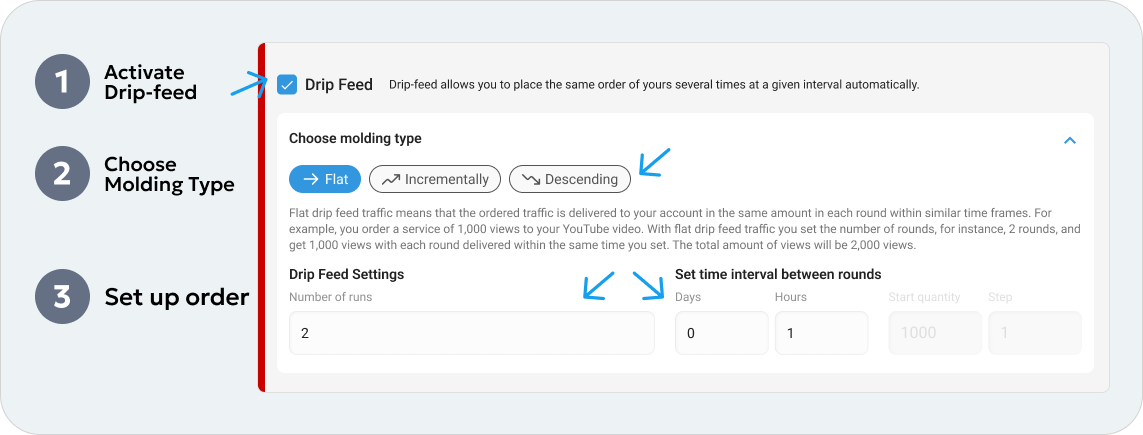
If you have any difficulties or can’t locate the drip-feed option for your specific service, don’t hesitate to contact our expert support team through live chat on tube.biz.
-
Keep in mind that autopromotion applies for boosts and orders only to your next content upload, not your previous one. Plan your promotional campaigns accordingly.
-
Autopromotion, or subscription, is an innovative promotional system designed to save you time, automate campaigns, and eliminate the need for manual order creation. With a subscription, you can establish an automated flow of followers, views, likes, and comments for each new video released on your channel.
-
When utilizing drip-feed, your wallet balance is deducted only for the specific quantity of views, likes, comments, etc., you’ve chosen for that particular delivery, not the entire order. To ensure seamless promotions, maintain a positive balance to cover future orders.
